
WCL0386WH1

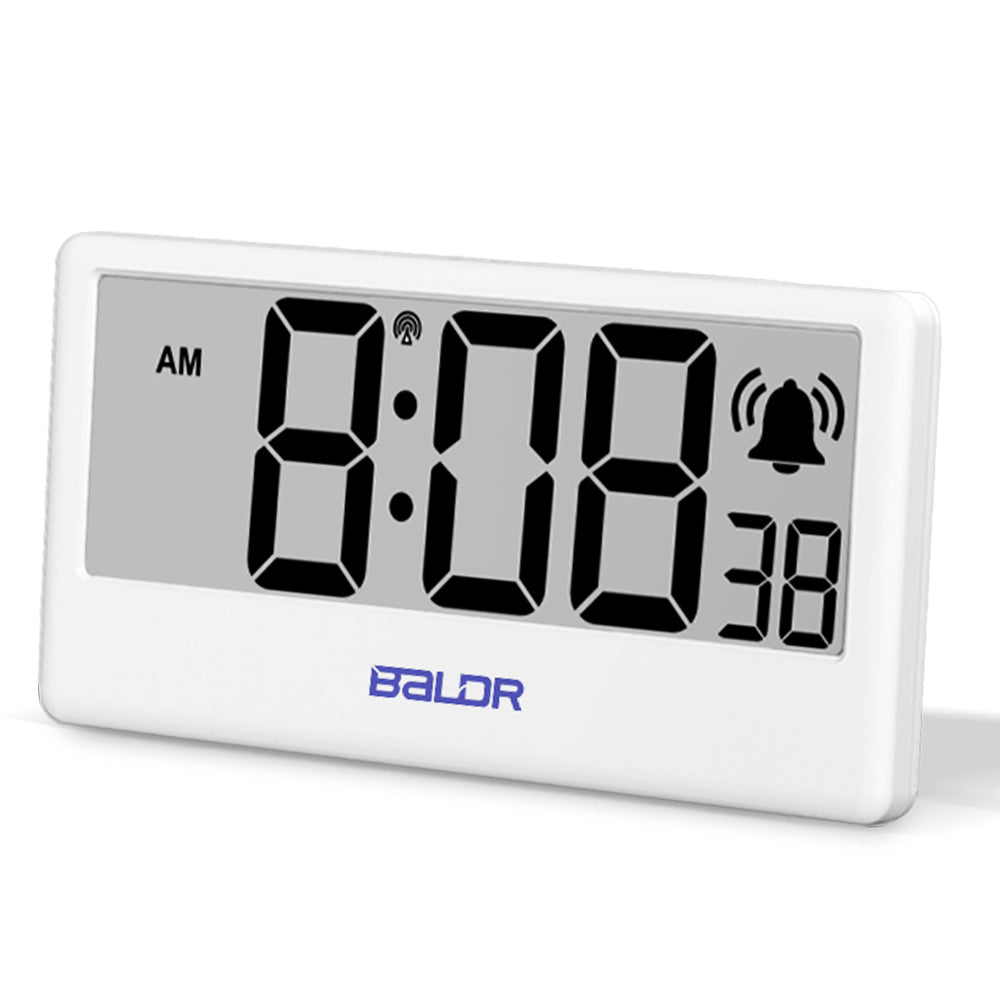
BALDR Internet Time Synchronized Precision Clock

Accurate, synchronized time with Wi-Fi control, smart alarms, automatic updates, customizable settings, and mobile app notifications

Estimated delivery between June 18 and June 20.

$19.99 $14.95
VIDEO

DESCRIPTION

The BALDR Internet Time Synchronized Clock offers precise timekeeping via Wi-Fi control. This smart digital alarm clock syncs with the internet, ensuring that you always have accurate, up-to-the-minute time. Works seamlessly with the BALDR Weather Station Hub (sold separately) to provide you with a fully integrated smart home experience. Perfect for anyone looking for an ultra-precise, internet-controlled clock.

FEATURES

Introducing the BALDR Internet Time Alarm Clock, a stylish and feature-packed addition to your space. With its seamless synchronization to internet time through the Baldr Weather Station Hub (sold separately), this clock offers unparalleled accuracy without the need for manual adjustments. The large digit display, complemented by a warm backlight, ensures effortless time reading day or night. Setting up the clock is a breeze with its user-friendly interface and just four buttons. It also boasts a handy timer function for efficient time management and a convenient snooze feature for those cherished extra minutes of rest. Upgrade your timekeeping experience with the BALDR Internet Time Alarm Clock, a reliable companion for your everyday routine.

  1. HIGH PRECISION CLOCK with Automatic Synchronization (with Baldr Weather Station Hub, sold separately): When paired with the Baldr Weather Station Hub (sold separately), this clock automatically syncs with internet time, ensuring accurate timekeeping without any manual adjustments. If you have the Baldr Weather Station Hub, you can conveniently pair additional clocks for different areas of your home.

  2. LARGE DIGIT DISPLAY with Warm Backlight: The clock's clear LCD display shows the time, minute, and second with large digits. The warm backlight can be activated with a touch button on top, making it easy to see the time at night. This feature is especially useful for seniors who can read the time without getting close to the clock.

  3. EASY SETUP for Manual Use: Even without a weather station hub, using this clock is simple. It has only four buttons on the back, allowing you to easily set the time step by step.

  4. TIMER FUNCTION for Efficient Time Management: Take advantage of the built-in timer function to manage your time effectively. Whether it's for exercise, work, or cooking, this feature helps you stay organized and make the most of your time.

  5. CONVENIENT SNOOZE FUNCTION: Never worry about being late again. The clock has a snooze function that gives you an extra 5 minutes of sleep after the alarm rings. Simply press the top button lightly, and you can rest a little longer without the fear of oversleeping.

SPECIFICATIONS
Item Size 0.5 x 5.5 x 3 inches
Color White
Power Supply 3 x AAA batteries (Not included) 
Net Weight 3 oz
Package Weight 5 oz
Package Contains 1 x Digital Alarm Clock 
1 x User Manual

Pay with

  • American Express
  • Apple Pay
  • Discover
  • Mastercard
  • PayPal
  • Shop Pay
  • Visa

Your transaction is protected with advanced security measures to keep your information confidential
No images available for this product.

FAQs

When paired with the Baldr Weather Station Hub(sold separately), this clock automatically syncs with internet time, ensuring accurate timekeeping without any manual adjustments. Without the Wifi Weather Station, the clock will work as a regular clock and requires manual setups.

Yes, the WIFI Weather Station is required or you can only use it as a regular clock - you will need to set up the time manually and the time will not be automatically updated.

Yes! You can buy additional Internet Clocks and synchronize them with a single Wi-Fi Weather Station, ensuring precise internet time across various areas of your home. Each Wi-Fi Weather Station can connect to up to 9 additional devices.

To synchronize the Internet Clock, please first power on the WiFi Weather Station and press the “+/WiFi” button until the screen displays “SCAN.” Complete the WiFi connection process and ensure the weather station is successfully connected to your network.

Next, open the Weather Station page in the App and navigate to Settings. Verify that the “Automatic Broadcast Time” option is enabled. This allows the weather station to automatically synchronize the clock with the current time.

Once the weather station is connected and the automatic broadcast feature is enabled, insert the batteries into the Internet Clock. Within 1–2 minutes, the clock should automatically receive and synchronize the current time.

If the clock does not sync automatically, you can manually send the time signal by selecting “Broadcast Time” from the Settings menu and initiating a broadcast to the clock.

If the clock still fails to synchronize after completing the above steps, please contact our support team for further assistance. We will be happy to help.

Recently viewed products